Frets on Fire Wiki: The Ultimate Guide & Modern Compatibility Resource
Welcome to the definitive digital encyclopedia for Frets on Fire (FoF), the legendary open-source music rhythm game that revolutionized PC guitar simulation. Whether you are looking for the clean Frets on Fire download, configuring inverted keyboard gameplay, or troubleshooting legacy OpenGL errors on Windows 11 and Windows 10, our comprehensive wiki provides 100% safe, verified, and community-backed solutions.
🎸 What is Frets on Fire? An Inside Look
Released as a groundbreaking entry for the prestigious Assembly 2006 Game Development Competition, Frets on Fire shocked the gaming world by winning first place. Developed by the talented indie collective Unreal Voodoo, this legendary PC guitar simulator brought the high-octane thrills of arcade music rhythm games straight to standard desktop computers and laptops completely for free.
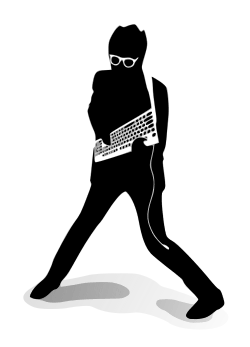
The core brilliance of Frets on Fire lies in its unique, immersive hardware adaptation. Instead of forcing players to buy expensive plastic peripherals, the game turns your standard office hardware into a musical instrument. Players hold their computer keyboard upside down—gripping it like the neck of an authentic electric guitar—using the function keys to fret notes and the thumb to strike the strum bar.
“The original team consisting of Sami Kyöstilä (Programming), Tommi Inkilä (Music/SFX), and Joonas Kerttula (Graphics) crafted a timeless mechanic that paved the way for modern PC rhythm clones.”
— From the Official Assembly Archive
Project Metadata & History
- Original Developer: Unreal Voodoo
- Release Framework: Assembly 2006 (Winner)
- Programming Language: Python (Full Source)
- Graphics Library: PyOpenGL / SDL
- Cross-Platform Eco: Win, Linux, macOS, FreeBSD
GPLv2 Open-Source Freedom: You are fully authorized to distribute, host, and run the client binaries under the GNU General Public License.
🚀 Frets on Fire Core Features & Gameplay Highlights
Discover why millions of rhythm game enthusiasts and retro PC gamers still praise this lightweight open-source masterpiece.
Iconic Inverted Keyboard Style
No plastic guitar controller? No problem. The game is perfectly optimized for an inverted keyboard configuration. Hold your keyboard like a real guitar, pressing F1-F5 as frets and hitting Enter or Space to strum.
Universal Controller Support
Fully compatible with standard PC guitar controllers, legacy PlayStation 2 adapters, Xbox 360/One instruments, and generic USB joysticks. Easily bind your custom inputs via the intuitive in-game settings to achieve latency-free inputs.
Built-in Song Editor & Importer
Features an internal song builder that allows you to import any .ogg audio track and craft your own custom charts. It also includes an automated game disc ripper designed to seamlessly import official tracks from Guitar Hero I and Guitar Hero II.
Ultra-Lightweight 2026 Optimization
Requires only a staggering **128 MB of RAM** and a standard OpenGL compatible graphics card. This makes Frets on Fire the ultimate rhythm game to run on low-end budget PCs, vintage gaming rigs, modern office laptops, or lightweight Linux setups.
⏳ The Evolution of Frets on Fire: Original vs. Community Forks
Understanding the difference between the vanilla 2008 release, enhanced fan-made forks, and modern spiritual successors.
While the official development of the vanilla game paused at version 1.3.110, the open-source nature of the project allowed passionate developers to clone, modify, and elevate the source code. If you are exploring the ecosystem, here is the historical roadmap of how Frets on Fire evolved over the decades:
1. Vanilla Frets on Fire (The Foundation)
The original client released by Unreal Voodoo. It features the raw Python code, standard keyboard mapping, 4 built-in tracks, and basic standard OpenGL rendering. It is the absolute purist experience but requires compatibility configurations on modern operating systems.
2. FoFiX (Frets on Fire X – The Peak Modifier)
The most famous and successful open-source fork. FoFiX drastically overhauled the original code by adding support for full customizable themes (skins resembling Guitar Hero III or Rock Band), multiplayer game modes, bass/drum track integration, and optimized script handling.
3. Clone Hero & YARG (The Modern Successors)
Built from scratch on modern game engines (such as Unity) rather than Python. While they do not share Frets on Fire’s legacy codebase, they are the current standard for competitive PC rhythm play. Notably, modern communities still use file formatting logic originally designed during the FoF modding era.
💡 Historical Wiki Fact: Because Frets on Fire laid down the standard song.ini, notes.mid, and audio splitting parameters, almost all custom songs created today for modern clones remain deeply rooted in infrastructure invented by the FoF community over fifteen years ago!
🛠️ How to Install & Run Frets on Fire on Modern Windows & Linux
Because vanilla Frets on Fire was compiled years ago, executing it on current hardware environments requires specific sequential steps. Follow this definitive deployment roadmap.
Acquire the Untouched Archive
Navigate to our verified Download Portal and secure either the Full Version Installer or the standalone Portable ZIP Archive. The portable archive is highly recommended for modern desktops to avoid Windows registry clutter.
Configure Legacy Windows Compatibility Layer
Extract the game files. Right-click on FretsOnFire.exe, select Properties, and move to the Compatibility tab. Check the box for “Run this program in compatibility mode for” and choose Windows XP (Service Pack 3) or Windows 7. Check “Run as administrator” to bypass modern folder write restrictions.
Execute Graphics & Audio Initialization
Launch the executable. If you receive a black frame or prompt error, open your graphics card control panel (NVIDIA/AMD/Intel) and force the application to run with standard OpenGL Hardware Acceleration enabled. Ensure your OS desktop color profile is set strictly to 32-bit.
🐧 Quick Note for Linux Terminal Users:
Ensure you have full SDL and PyOpenGL development headers installed before firing up the binaries. On Debian/Ubuntu based environments, execute sudo apt-get install python3-pygame python3-opengl to fulfill native engine dependencies prior to code deployment.
🛠️ Custom Song Anatomy & Modding Architecture
Deconstructing the open-source file system to customize stage graphics, translate game languages, and map custom tracks.
📁 Anatomy of a Frets on Fire Song Folder
Every track in Frets on Fire lives inside an isolated directory under /data/songs/[song_name]/. To successfully add or build a custom track, the folder must contain these exact infrastructural components:
├── 📄 song.ini (Metadata: title, artist, track length)
├── 🎵 guitar.ogg (The main audio track played during notes)
├── 🎵 song.ogg (Background audio mix / backing band)
└── 🎼 notes.mid (The MIDI data holding note placements)
If an error occurs where notes do not render on the fretboard, it is almost always caused by a corrupted notes.mid or misconfigured encoding in the text configuration array of the metadata file.
🎨 Extensible Modding Capabilities
Frets on Fire was built intentionally with data abstraction in mind, allowing the visual layer to be overhauled completely without modifying the core compiled binary.
- Stage Graphics Customization: PNG assets inside the graphics directory can be redrawn to skin the 3D fretboard, flames, fret rings, and main screen background.
- Localization Packages: All menus and tutorials are text-mapped, allowing translators to easily drop localized string arrays into the language system.
-
Collada 3D Modeling: The internal 3D system loads direct
.daefiles via an embedded module, opening pathways for modifying game note meshes.
📚 Explore the Frets on Fire Knowledge Base
Select a comprehensive wiki chapter below to get instant access to files, gameplay mechanics, modifications, and troubleshooting guides.
Game Downloads Archive
Access secure, 100% untouched installation packages and lightweight portable ZIP archives for Windows 11/10, Linux, and OS X. Includes official safe song bundles.
Controls & Setup Guide
Master the signature “upside-down keyboard” technique. Learn default hotkeys, input mapping parameters, and how to eliminate hardware key ghosting or locking.
Guitar Hero Importer
A step-by-step walkthrough on using the internal game ripper alongside oggenc.exe to dump full tracklists from your legacy Guitar Hero I & II game DVDs.
Modern Compatibility FAQ
Fix instant crashes, OpenGL rendering bugs, and cx_Freeze startup errors on Windows 10 & 11 systems using specialized compatibility layers.